
UNATION - Discover Events
UNATION, INC.Events
3.093.00 Reviews
- Version
- 7.9.15
- Installs
- 100.00K
- Age Rating
- Everyone
Screenshots
Our Review of UNATION - Discover Events
 Analysis by Appyee
Finding something to do should feel exciting, not like another chore. I spent time using UNATION - Discover Events as an events app, looking at how it helps people find nearby activities and handle tickets. My overall impression is mixed but useful: it can be a practical starting point when I want local ideas in one place, yet the experience depends heavily on how well the available event information is presented and how comfortable I am checking details before committing.
The app comes from UNATION, INC. and is free to use. It is aimed at an Everyone audience, which makes sense for a service covering general local activities rather than a narrowly defined hobby. It has been available since Dec 23, 2015, and the current version is 7.9.15 for devices running Android 8.0 or later. Its reach is respectable, with over 100 thousand installs, although the average rating sits at 3.0 from around 242 ratings and 93 written reviews. I read that combination as a sign that the idea is useful to some people, but that the day-to-day experience may not be equally smooth for everyone.
How clearly the app helps me find an event
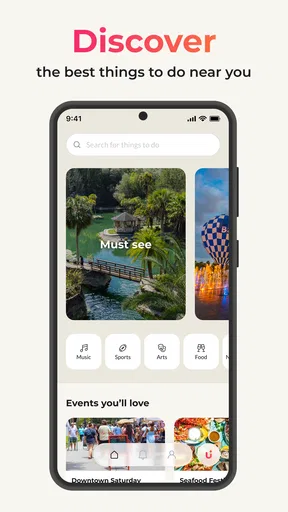
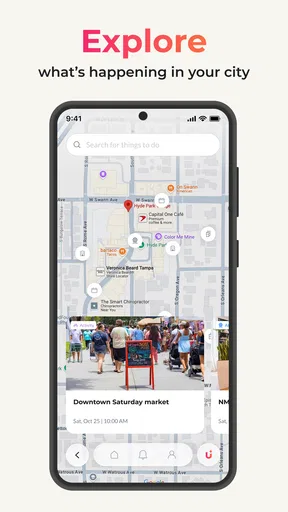
The strongest reason to open this app is simple: I may know that I want to go out, but not exactly what I want to do. Instead of beginning with a specific venue or ticket company, I can approach the search from the event itself. That is helpful for browsing local possibilities, especially when my plans are flexible and I am willing to compare several options.
I find this approach more spontaneous than searching separately for concerts, family activities, sports, community gatherings, or other occasions. A dedicated venue app is usually better when I already know where I am going. A general ticket marketplace can be better when I am focused on a major ticketed event. UNATION occupies a middle ground: it is useful when discovery matters as much as purchase.
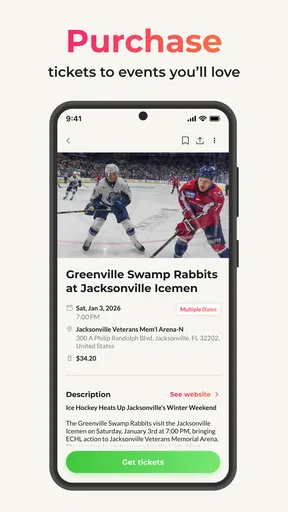
Readability is important in that kind of app because event cards can contain several pieces of information at once. I need to recognize the event name, location, date, time, and ticket context without mentally sorting through a crowded screen. When those details are presented clearly, browsing feels quick. When they compete for attention, I have to open each listing and double-check the basics, which makes casual discovery less relaxing.
My practical advice is to treat the first screen as a shortlist rather than a final decision. I would save or note the most promising options, then inspect each one carefully. This avoids a common mistake with event discovery apps: choosing the most attractive title before checking whether the time, location, or ticket arrangement actually fits my plans.
Navigation that works best for flexible plans
I think the app is most comfortable for someone who enjoys browsing in short sessions. For example, if I have a free Saturday and want to see what is happening nearby, I can use the event listings to build a small menu of possibilities. I would then compare travel time, start time, and whether the activity suits the people coming with me.
That workflow is different from opening an app with one fixed goal. If I already know the exact event, I would usually go directly to the organizer or ticket provider because fewer steps may be involved. UNATION makes more sense earlier in the process, when I am answering the question, “What could I do?” rather than, “How do I access this one event?”
The app’s event focus also means that the quality of navigation is tied to the quality of local coverage. A broad selection is valuable only if I can narrow it down without effort. I would like to see enough context in each listing to decide whether it deserves a closer look, while still keeping the browsing screen easy to scan.
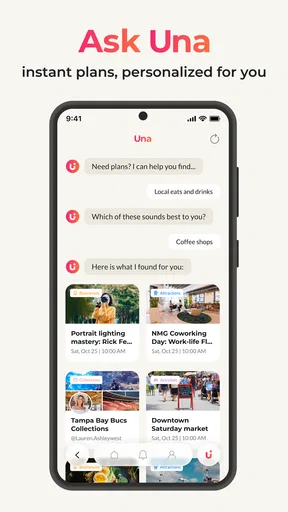
One useful habit is to search with a specific occasion in mind instead of endlessly scrolling. I might begin with “something suitable for children,” “an evening activity,” or “a weekend outing,” then compare the results against practical needs. This turns the app from an endless feed into a planning tool.
Readable information matters more than visual excitement
For me, event apps should favor clarity over decoration. A large image can make an event look appealing, but it does not answer the questions I need answered before buying: where it is, when it starts, what kind of ticket is involved, and whether the listing matches my expectations. The app is most useful when its visual presentation supports those decisions rather than distracting from them.
People with different reading abilities may approach the same listing differently. Someone who reads quickly may be happy to scan several cards. Someone with dyslexia, reduced vision, attention difficulties, or limited familiarity with local venues may need to open the full listing and process each detail separately. I would not rely on a quick glance alone. Reading the complete event information is the safer approach for everyone, particularly when a mistake could mean arriving at the wrong place or missing the start.
I also recommend checking the event from a calm setting before purchasing. Browsing on a moving bus, in a noisy street, or under bright sunlight can make small text and dense layouts harder to handle. If I am making a decision in one of those situations, I prefer to shortlist first and complete the ticket step later when I can concentrate.
Using it with different abilities and everyday situations
I use this section to focus on how event discovery fits into real life when attention, movement, reading, or sensory needs vary. A helpful approach is to decide what information matters most to the person joining me before browsing, then make the search serve that plan rather than adding more decisions. That leads naturally to a closer look at practical navigation and ticket steps.
Motor comfort and the ticket workflow
Event discovery often involves repeated taps: opening a listing, reviewing details, moving toward tickets, and sometimes returning to compare another option. That is manageable for most users, but it can become tiring for someone with limited dexterity, tremors, joint pain, or difficulty performing precise gestures. I would use deliberate, slower interactions rather than trying to move quickly through several listings.
A realistic example is planning an outing with a family member who has reduced hand control. I would do the browsing together, read the important details aloud, and avoid making a purchase until we had agreed on the event and the seating or entry information. This is not just considerate; it reduces the chance of selecting the wrong listing during a rushed sequence of taps.
The ticket side deserves extra attention because discovery and purchase are not always the same experience. A listing can help me identify an event, while the final transaction may involve another step or a separate ticket process. I would keep the event name, date, and venue visible while moving through that stage, and I would review the final details before confirming anything.
For users who rely on switch access, voice control, screen magnification, or other device-level tools, the most important test is whether each control has a clear purpose and can be reached in a predictable order. I cannot treat the app as automatically accessible simply because it is intended for a general audience. I would test the particular workflow on the user’s own phone, especially before relying on it for an important event.
Sensory load and decision-making
Event browsing can be stimulating by nature. Bright promotional images, many categories, changing listings, and urgent ticket language may be uncomfortable for people who are sensitive to visual or cognitive overload. I find that the app is easier to manage when I set a narrow goal and stop once I have a few realistic choices.
Instead of trying to inspect everything nearby, I might choose one day, one approximate area, and one type of activity. That reduces the number of decisions and makes it easier to compare the information that matters. It is also helpful when planning with someone who becomes overwhelmed by too many options, because I can present two or three suitable events rather than asking them to browse the entire catalog.
People with hearing-related needs should pay particular attention to how event details communicate important information. A listing may identify the event, but practical questions about announcements, venue procedures, or changes can still matter. I would not assume that an event is suitable for a specific sensory need from its title alone. I would review the organizer’s information and contact the venue when an accommodation is essential.
For someone with cognitive disabilities, memory difficulties, or language-processing challenges, I would create a simple plan outside the app: event name, address, start time, ticket status, transport, and a contact person. The app can support discovery, but a separate written summary may make the actual day much less stressful.
Situational access: the phone is not always used in ideal conditions
Accessibility is not limited to permanent disabilities. I may be using the app while carrying shopping bags, standing in a crowded station, dealing with poor lighting, or trying to coordinate a group. Those situations change how much attention and precision I can give the screen.
When I am already on the way to an event, I want the essential details to be easy to retrieve. I would check the address and timing before leaving rather than waiting until I am outside the venue. That is especially important for people who need extra travel time, step-free routes, quieter entrances, or a companion’s help.
Parents and carers have a different kind of access challenge. They may be browsing with one hand while supervising a child, or comparing events for people with different ages and energy levels. In that situation, the app is more useful as a planning aid than as a last-minute decision tool. I would gather the details in advance and share them with everyone involved.
Travel also changes the value of event discovery. A nearby listing may still be impractical if the route includes stairs, difficult transfers, or a venue that is unfamiliar. I would use the app to find candidates, then verify the journey through a map and confirm venue arrangements directly when accessibility affects whether the outing is possible.
Where the app may still create barriers
The most important limitation is that a general event platform cannot guarantee that every organizer presents information in the same helpful way. One listing may be easy to understand, while another may leave me with questions about entry, timing, venue layout, or ticket conditions. That inconsistency is a real barrier for users who need reliable details before leaving home.
I also would not assume that an event’s presence in the app means it is suitable for every age, ability, or sensory preference. The Everyone content rating describes the app’s general audience, not the practical accessibility of each individual activity. A family event, a crowded nightlife occasion, and a seated performance can have completely different demands even if they appear in the same discovery space.
Ticket purchasing can introduce another layer of friction. If the process moves between discovery and transaction, users may need to recheck information, understand a new screen, or manage details in a different context. For people who find transitions difficult, I recommend taking screenshots or writing down the key event information before continuing, while being careful not to expose private payment details.
Another barrier is uncertainty. A person with an access need may want to know whether a venue has seating, quiet areas, accessible toilets, captioning, sign-language support, or an appropriate entrance. I would not fill those gaps with assumptions. If the answer affects attendance, contacting the organizer is the responsible next step.
Users who need a highly controlled, low-distraction experience may prefer a direct venue app or a simple calendar-based planning method. Likewise, someone who has already selected an event may find a specialist ticket provider more efficient. UNATION is not automatically the best tool at every stage; its value is greatest when I am discovering and comparing local options.
Three workflows that make the experience more dependable
My first recommended workflow is the “shortlist, verify, then buy” method. I browse until I have a few plausible events, open each one for the full details, compare the practical information, and only then move toward tickets. This prevents attractive presentation from deciding for me before I know whether the event is actually workable.
The second is to plan around the person with the greatest access requirement. If one member of the group needs more travel time, a quieter environment, or assistance with navigation, I use that person’s needs as the starting point. An event that works for everyone is better than a more exciting option that creates stress for one attendee.
The third is to separate discovery from day-of-event support. I use the app to find the activity, but I keep the address, schedule, ticket information, and organizer contact details somewhere easy to reach. That backup is valuable if I am offline, distracted, or helping someone else while traveling.
These workflows also answer a common practical question: can the app replace all other planning tools? In my experience, no. It can be the place where I discover an event, but a calendar, map, notes app, or direct organizer contact may still be better for the rest of the outing. Using each tool for its strongest job produces a more reliable plan.
Who I would recommend it to
I would recommend this free events app to people who enjoy local discovery and do not always have a fixed destination in mind. It is particularly suitable for flexible weekend planning, trying to find something for a group, or exploring activities beyond the venues I already know. The broad purpose makes it more interesting than repeatedly checking the same ticket source.
I would also consider it useful for someone who wants to compare possibilities before discussing them with friends or family. The app gives me a starting point for that conversation, but I would still verify the details that affect access, transport, timing, and cost before treating a listing as a firm plan.
I would be more cautious about recommending it to someone who needs guaranteed accessibility information in the listing itself, or who finds multi-step ticket journeys difficult. That person may be better served by a venue or organizer with detailed access guidance and a direct support channel. The same applies to anyone who already knows the exact event they want; going straight to the official source may involve less browsing.
My inclusive verdict
UNATION - Discover Events is a useful discovery layer, not a complete accessibility or outing-management solution. I like its basic idea because it helps turn an open-ended “what can we do?” question into a list of local possibilities. The free price removes an obvious barrier to trying it, and the Everyone rating makes it approachable for general household use.
Still, the 3.0 average from around 242 ratings suggests that I should keep expectations realistic. I would not install it expecting every listing or ticket step to feel equally polished. The app is most valuable when I browse patiently, compare details, and use other tools to confirm the parts that matter most.
My final recommendation is conditional but positive: try it if discovering nearby events is your main goal, especially when your plans are flexible. Use a careful shortlist-and-verify routine, plan around the access needs of the whole group, and contact organizers when an accommodation is essential. If you need a highly predictable purchase path or detailed venue accessibility information, choose a more direct specialist option instead. For casual local exploration, though, this app can be a worthwhile first stop.
Verdict
Strengths of UNATION - Discover Events
- Find local concerts, festivals, sports, and community events in one app.
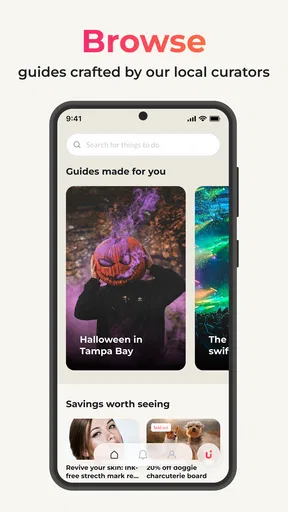
- Personalized recommendations help surface activities matching your interests.
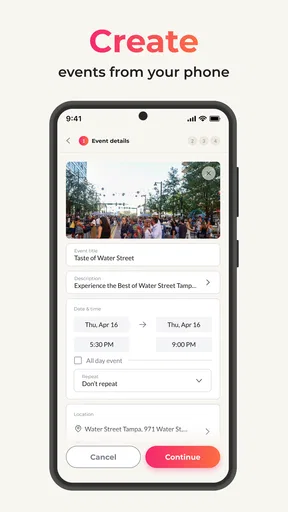
- Event pages provide useful details such as dates, locations, and ticket links.
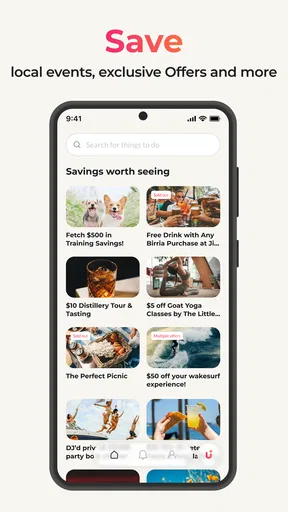
- Save appealing events to keep plans organized and accessible later.
- Useful for discovering activities beyond the usual entertainment venues.
Limitations of UNATION - Discover Events
- Event availability and app usefulness vary significantly by location.
- Some listings redirect to external websites to complete ticket purchases.
- Recommendations may feel limited in areas with fewer listed events.
- Event details can change, so checking the organizer’s updates is advisable.
- The app may require notification access for timely event reminders.
Similar Picks in This Category
View All
Easy Quran Mp3 Audio Offline
Muslim Worldapp4.7

Invitation Maker: Cards & RSVP
Greetings Island4.9

StubHub - Live Event Tickets
StubHub4.3

Fever: Events & Tickets
Fever Labs4.7

Epic Freebie Games Radar
Arioch Pds - Apps & Games4.4

Invitation card Maker, Design
Splendid App Maker4.9
Frequently Asked Questions
What is UNATION - Discover Events used for?
UNATION - Discover Events is an event-discovery app designed to help you find things to do nearby or in destinations you plan to visit. After exploring the app, I found listings for activities such as concerts, sports, festivals, nightlife, food experiences, family outings, and community events. You can browse recommendations, view event details, check dates and locations, and follow links or options for tickets when available.
Does UNATION show events in my local area?
Yes, UNATION is intended to provide location-based event recommendations, although the amount and variety of content can depend heavily on your city. The app may use your location to suggest nearby activities, while also allowing you to explore other destinations manually. Before downloading, keep in mind that larger metropolitan areas generally have more listings than smaller towns or regions with fewer participating organizers.
Can I buy tickets directly through UNATION?
UNATION may provide ticketing options for some events, but the exact purchasing process depends on the organizer and the event listing. In some cases, you may complete the transaction through UNATION or an integrated ticket provider; in others, the app redirects you to an external website. Always review the final price, fees, refund policy, venue rules, and seller information before confirming a purchase.
Is UNATION - Discover Events free to download and use?
The app is generally available to download without an upfront charge, and browsing event information is typically free. However, free access to the app does not mean that every activity is free. Many listed events require paid admission, and ticket providers may add service or processing fees. Some promotions, reservations, or premium experiences can also have separate costs that should be checked before attending.
Does UNATION require an account or access to my location?
You can usually explore at least some event information without immediately creating an account, but signing in may be useful for saving events, receiving personalized recommendations, or managing plans. Location access is also helpful because the app’s main purpose is discovering nearby activities. You can review and change these permissions in your Android or iOS settings, and you may choose manual location browsing if you prefer not to share your precise location.
